 |
CRI Sofdec2
Last Updated: 2022-11-21 16:25 p
|
|
CRI Sofdec2
Last Updated: 2022-11-21 16:25 p
|
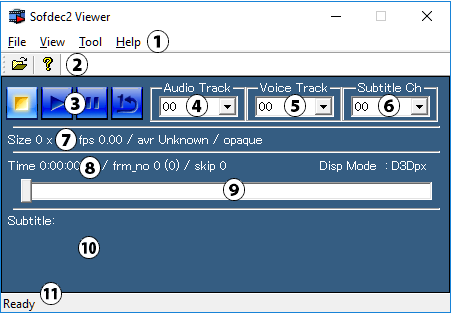
| Section Name | Description |
|---|---|
| (1) Menu bar | Consists of the [File], [View], [Tools], and [Help] sub-menus. |
| (2) Toolbar | Contains shortcuts for commonly used menu commands. |
| (3) Playback controls | Consists of the following buttons from left to right: [Stop], [Play], [Pause], [Loop]. |
| (4) [Audio Track] combo box | Used to select the audio track for playback. (00 to 31) |
| (5) [Voice Track] combo box (*1) | Used to select the voice track for playback. (00 to 15) |
| (6) [Subtitle Ch] combo box | Used to select the subtitle channel to display. (00 to 15) |
| (7) File information | Displays information about the currently playing movie file. From left to right: movie size, frame rate, and average bit rate. |
| (8) Playback information | Displays playback information for the currently playing movie. From left to right: play time, displayed frame number (total number of frames), skipped frames, and the display device. |
| (9) Seek bar | Used to move the playback position in the movie. |
| (10) Subtitle information | Displays the subtitles and subtitle character encoding for a subtitled movie. |
| (11) Status bar | Displays help messages. |